
PsycINFO Expert Tip: Search Alerts & PsycALERTS

If you’re working on a long-term research project, one of your first steps may be a review of the literature. You’ll spend some time picking your best search terms, creating a search query, and identifying journals that are a close fit with your topic. As you move into the data gathering and writing stages, you’ll still want to keep an eye on new publications in your area.

Or if you are an instructor or practitioner, even though your formal schooling is completed, you want to make sure you continue learning about new discoveries in your field of expertise.

Setting up a search alert helps you efficiently keep up with scholarly publications that meet your criteria as they are added to PsycINFO®. There are three types of search alerts you can set up on APA PsycNET®: Topic Alerts, Citation Alerts, and New Publication Alerts. Together, these are called PsycALERTS®.

This post explains in detail how PsycALERTS work on APA PsycNET. If you access PsycINFO® on EBSCOhost, ProQuest, or Ovid, these platforms have free personal accounts and search alert tools that serve the same purpose. It’s best to get the alerts from the same platform that you use to access PsycINFO, so you can easily find the full-text at your institution.
Continue reading

Webinar Alert: Spring PsycINFO Sessions for Librarians

Our spring semester lineup of webinars for librarians kicks off next week. If you’re looking to expand your search skills, or just need a PsycINFO refresher, we hope you’ll join us! We offer two different one-hour sessions, both of which include live search demos.


Behind the Scenes of PsycINFO reviews the structure of APA Database records, and covers fields such as Index Terms, Keywords, and Classification Codes.


Beyond Subject Searching in PsycINFO includes a review of searching for information on tests and measures, and looks at other ways you can use PsycINFO to do more than just locating articles.


Additional Webinars for Students and Faculty

Looking for sessions for students and faculty, or our APA Style CENTRAL Online Introduction? Please visit our main webinars page for schedules and descriptions.


View Tutorials Anytime, Anywhere!

We also offer a large library of video tutorials. These can help you – and the students, faculty, and researchers you support – become a PsycINFO expert: https://www.youtube.com/PsycINFO

Updated Help Pages

At the end of last year, we reviewed and updated the APA PsycNET® help pages to make sure the content was current and easy for our users to navigate.


The main help explains how to set up a search, manage the results list, use your MyAPA Account, the Browse menu, and other tools you’ll see on APA PsycNET®.

http://help.psycnet.org/en/


The PsycTESTS help explains searchable fields and the record structure that are unique to the PsycTESTS® database on APA PsycNET.

http://help.psycnet.org/en/psyctests-help/


The admin center help is for library administrators and explains how to customize for your institution, view usage statistics, and use other tools in the APA PsycNET Admin Center.

http://help.psycnet.org/en/admin-center-help/


Something missing? Let us know! psycinfo@apa.org

Tutorial Tuesday: How (and Why) to use the APA Thesaurus on APA PsycNET

It’s Tutorial Tuesday! In this series, we explore APA’s library of video tutorials available on the PsycINFO® YouTube channel and the APA Style CENTRAL® YouTube channel. Please feel free to link to or embed our videos in your library websites or LibGuides, course management systems, or other locations where students, faculty, and researchers will find them.

We recently updated one of our tutorials: How (and Why) to Use the APA Thesaurus on APA PsycNET®.""

How can you be sure you are finding the best results for your search?

By using the best search terms! The APA Thesaurus of Psychological Index Terms (“APA Thesaurus”) contains the controlled vocabulary that APA uses to describe and categorize all content indexed in PsycINFO. This resource is regularly updated to include new and changing terminology for topics in the behavioral sciences, and you can put it to work for you!

Using the APA Thesaurus helps you eliminate “noise” from your search and retrieve the most relevant results by revealing the best search terms for your topic. The APA Thesaurus is a valuable tool for students new to research or any researcher who is new to a topic area and may not yet know the best terminology for searching.

This brief video (2:40 minutes) demonstrates the benefits of using the APA Thesaurus when searching databases on the APA PsycNET platform, and includes:

  • Examples of recent terminology updates to the APA Thesaurus;
  • How to access the APA Thesaurus when crafting a search;
  • Using the APA Thesaurus to find related terms for narrowing or expanding your search;
  • Discovering index terms for broader concepts that encompass your research topic and make searching more efficient; and
  • Uncovering additional search terms you may not have considered.

This tutorial is a great resource to link from a LibGuide or course module for any class working with APA Databases on APA PsycNET, and can be helpful in answering email or chat reference questions.

The previous version of this tutorial will remain available, but if you have embedded or linked to it anywhere, we encourage you to update your materials with the link to this new version.

Related Resources:

APA PsycNET® Help Files Update

We are pleased to announce that a revised version of APA PsycNET® Help files is now available to support the July 2017 platform update. Help files were updated to reflect the new user-interface changes related to responsive design, content discovery, and search tools.

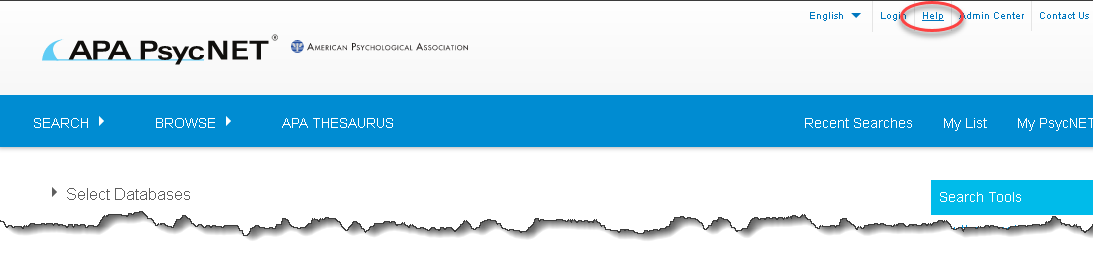
PsycNET Help is available at top-right of the screen, next to the Login link:

Help link shown to right of Login link

The APA PsycNET Help module includes detailed information about:

  • Getting Started with APA PsycNET, including database descriptions
  • Basic and Advanced Search, including fields, filters, and display options
  • Cited References searching
  • Search results, including searching, managing, filtering, and finding full text
  • Managing Searches, including email alerts, RSS feeds, and permalinks
  • Recent searches, My PsycNET, and MyList
  • Browse function for each database
  • APA Thesaurus, including why & how to incorporate it into your search
  • Additional search options, including Lookup tools, Boolean operators, truncation, and more.

Related Resources: