New Content for APA PsycTherapy (Spring 2026)

APA PsycTherapy: Streaming demonstration videos for teaching and learning psychotherapy techniques

On March 17, we added 18 new videos (24 hours of footage) to APA PsycTherapy, our streaming video database designed to meet the teaching and training needs of psychotherapy students and practitioners. Each video is recorded during an unscripted session to provide an authentic example of psychotherapy conducted by an expert clinician. Subscribers can use the linked video titles below to view the content on APA PsycTherapy! 

This update focuses on unique models of psychotherapy, including the videos featured below involving development of helping skills; an approach based on Buddhist concepts; and working with clients in unusually difficult circumstances. Additional sessions rounding out this update include principles of cultural humility; therapy for processing and changing emotions; and child therapists working with parents of the children they are treating.

  • Helping Skills in Therapy: Dr. Katherine Helm speaks with Drs. Clara E. Hill, Judith A. Gerstenblith, and Harold Chui about the helping skills model they have written about in the newest edition of Helping Skills: Facilitating Exploration, Insight, and Action. Dr. Hill reviews research supporting this evidence‑based approach, while Drs. Gerstenblith and Chui demonstrate its three goals—exploration, insight, and action—through session clips and discussion. Together they encourage trainees to approach the learning process with self‑compassion as they develop these core skills.
  • Buddhist Psychotherapy With an African American Male Client: Dr. Liang Tien, the cofounder of Buddhist psychotherapy, works with an African American client navigating the loss of his teaching job after a required exam. She supports him as he processes grief, frustration, and the impact of racial and gender bias, while also offering relevant self‑disclosure about her experiences with discrimination as an Asian woman and English‑language learner. She is also a co-author of the APA book, Buddhist Psychotherapy: Connecting Early Buddhism to Mindfulness and Western Psychotherapy.
  • Reframing Autism and Emotion Regulation Through Parental Mentalization: Dr. Norka Malberg meets with the parents of an 8‑year‑old recently assessed as autistic with support needs related to anxiety and emotion regulation. She explains how their daughter’s outbursts and ritual-like behaviors may reflect attempts to self‑soothe, offers guidance on viewing these behaviors as coping strategies, and outlines the next steps in a mentalization‑focused intervention.

Additional videos in this release (listed alphabetically by primary therapist):

With 998 videos covering 170+ therapeutic approaches and 360+ behavioral health topics, APA PsycTherapy provides a broad range of real‑world clinical demonstrations. The collection expands each year with 15–25 new sessions showcasing current practice and emerging clinical insights.


Related Resources

Using the Permissions Field in APA PsycTests

It’s Tutorial Thursday! In this series, we explore APA’s library of video tutorials available on the APA Publishing Training YouTube channel. Please feel free to link to or embed our videos in your library websites or LibGuides, course management systems, or other locations where students, faculty, and researchers will find them.

A new tutorial Using the Permissions Field in APA PsycTests is ready for your use. 

In this video, we’ll cover:

  • Filtering your APA PsycTests search by permissions type
  • Locating the permissions statement in the APA PsycTests Record
  • What each permissions type means for you
  • Types of use that are and are not permitted
  • When and how to contact the test’s publisher or the test’s author

Related Resources

Learning Commons Article: What is APA PsycTests?

Learning Commons Article: Request Permission to Include APA Content in My Publication

Blog Post: Getting Started with APA PsycTests – Using a Test You’ve Found  

YouTube Playlist: APA PsycTests 

APA Databases Webinars: Spring 2026

Interested in strengthening your APA database skills? Join an APA trainer for the next round of  webinars designed for students, faculty, and anyone else who wants to learn more about how to search APA PsycInfo more effectively!

Details and registration links are below; all times shown are U.S. Eastern.

APA PsycInfo: Beginner Search

This 60-minute session will help anyone who is new to searching the behavioral sciences literature using APA PsycInfo.

We’ll demonstrate simple yet powerful techniques that can increase your proficiency in short order, including how to quickly identify the best search terms; apply filters to narrow the range of results; and pinpoint empirical studies. Demo includes PsycInfo on multiple platforms and a preview of the PsycInfo Research Services platform.

Highlights include the use of APA Thesaurus terms and other database fields to target your search, Boolean operators to accurately include or exclude concepts, and cited references to find related research. 

Techniques covered can also be used with APA PsycArticles® and APA PsycBooks®.

APA PsycInfo: Advanced Search

This 60-minute session highlights some of APA PsycInfo’s advanced functionality that’s designed to increase your efficiency by retrieving better search results faster.

After an overview of the three main vocabularies [keywords, Thesaurus subjects, and Classifications] you can use to search APA PsycInfo, we’ll share some easy ways to quickly expand or narrow your list of search results.

You’ll also learn about syntax for proximity search and truncation; using citations to explore related research; applying search limits and results filters; using the Author Affiliation field to discover where research of interest is happening; searching the Test and Measures field for information about tests used in the scholarly literature; and using the Grant/Sponsorship field to discover potential funding sources. Demo includes PsycInfo on multiple platforms and a preview of the PsycInfo Research Services platform.

Semester Special: APA PsycBooks

This live demo focuses on the APA PsycBooks database and other Books titles and collections. 

Topics include:

–Top recommended fields to search, filter, and browse
–The new accessible ePub format
–“Explore Books” within APA PsycInfo Research Services
–APA Books beyond the PsycBooks Database
–Beyond Books: What’s new with APA Publishing 

Can’t attend a scheduled session?

New Thesaurus Terms for Searching APA PsycInfo (Fall 2025)

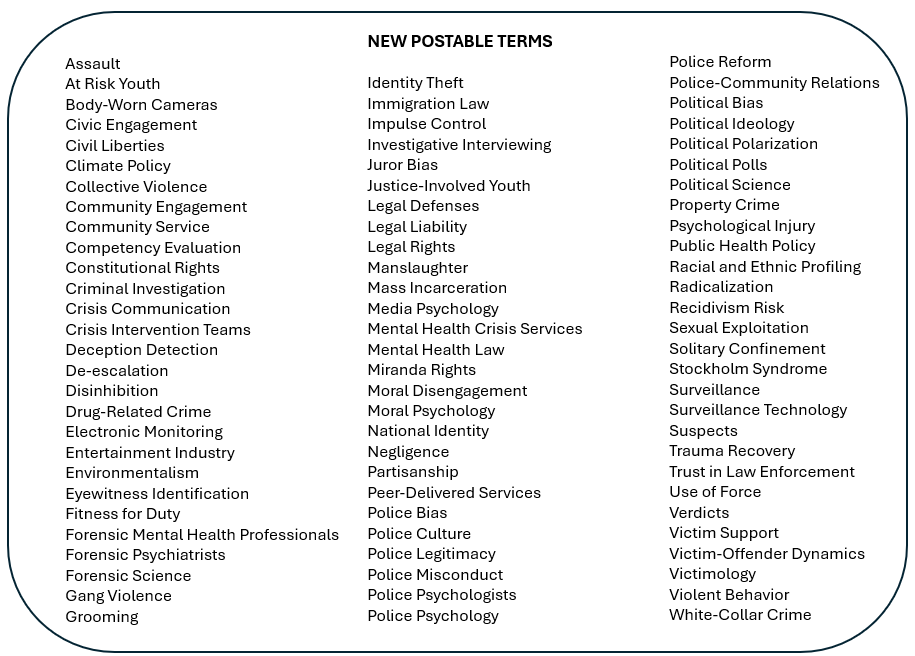
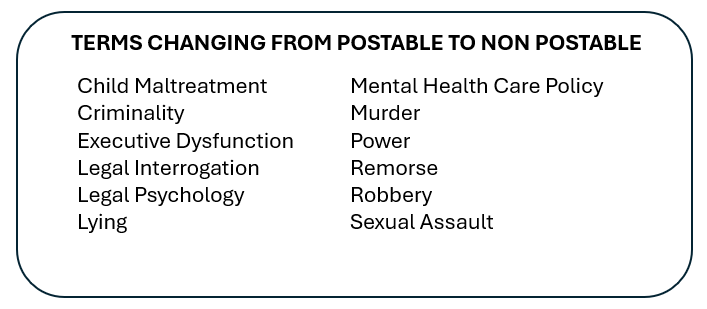
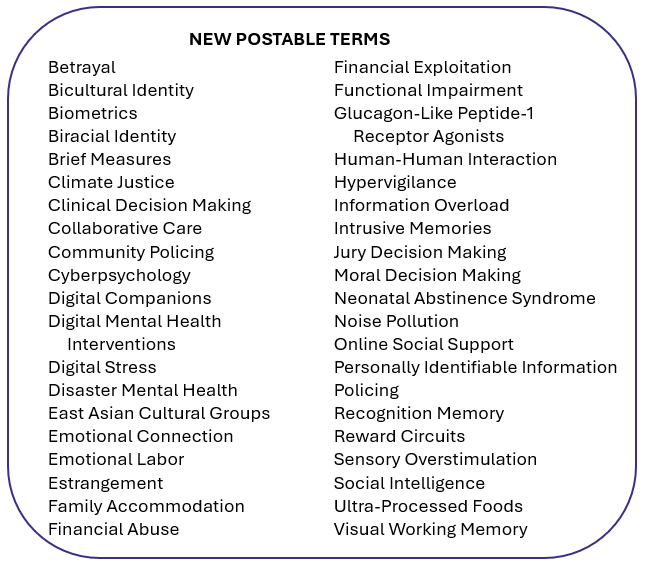
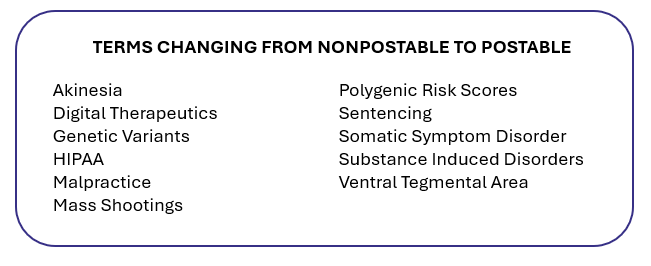
In November, APA added 94 new terms to its Thesaurus of Psychological Index Terms® to provide more effective searching on current topics, including positive psychology, neurology, and trauma. These new terms will be back-mapped to older records.

This Thesaurus update also includes 102 new cross-referenced terms, 673 revised scope notes, and 68 revised history notes. As part of this Fall 2025 update, our taxonomist reviewed about 1000 thesaurus terms that were introducted in the 1980s. 

Using the controlled vocabulary of the Thesaurus means a database search will quickly and accurately retrieve all publications related to a specific concept, regardless of the keywords the authors may have used.

This latest Thesaurus update includes edits for some existing terms. Thirty-five terms that were previously “cross-referenced,” that is, redirected you to the preferred “Use” or “postable” term, are now listed as postable terms themselves.

In addition, six terms have been edited for clarity. 

The Thesaurus tool is found on all platforms as part of APA PsycInfo® and redirects synonyms to the preferred “Use” term to include in your search. Each Thesaurus record includes links to broader terms, narrower terms, and related terms, the year the term was introduced, an historical note if applicable, and a scope note providing definition and application.

You can see the full list of Thesaurus changes on our website or view the PDF for more details.  

Related Resource: 
YouTube playlist – Using the APA Thesaurus to Find Relevant Articles on a Topic 


How to Format a Citation in APA Style using APA PsycNet

It’s Tutorial Thursday! In this series, we explore APA’s library of video tutorials available on the APA Publishing Training YouTube channel. Please feel free to link to or embed our videos in your library websites or LibGuides, course management systems, or other locations where students, faculty, and researchers will find them.

A new version of the tutorial How to Format a Citation in APA Style using APA PsycNet is available.

In this video, you’ll learn how to access APA style citations for items in APA PsycNet.

By the end of this video, you will be able to: 

  • Access an APA style citation for a result from an APA PsycNet search
  • Explain why it is important to double-check the citation that is found
  • Describe when it is valuable to use a citation management tool

Related Resources

Tutorial: How to Export Citations to Citation Management Tools

APA Style Homepage: https://apastyle.apa.org