APA Style CENTRAL Expert Tip: Exporting an APA Style Paper Reference List

Do you need to create an APA Style® reference list for sharing with your journal club, collaborating with a colleague, or preparing a course assignment? APA Style CENTRAL® can help with that!

How to export a paper’s reference list formatted in APA Style as a Microsoft Word file:

1. At the top of the screen, expand the My File Cabinet menu and select My Papers to view your list of saved papers. Open the file containing the reference list you want to export.

2. In the left navigation menu of the paper editing screen, use the arrow to expand the EXPORT menu and select Download.

3. Under the Download Paper heading, select Word (*.docx, selected by default) or PDF as the file type.

4. Use the Download Paper button to export the file.

5. The exported file will be saved in your browser’s default Downloads folder (or the location specified when saving the file).

Tip: To obtain a reference list for an annotated bibliography, begin a new paper by entering a title and then use the Add References button to immediately begin creating your reference list (see screenshot below). When you’ve finished adding references, use the steps above to export the paper as a Word file and continue working in Word to insert your annotation for each reference.

This expert tip was inspired by a question from a user like you! Have a question of your own?
Please let us know at Support@APAStyleCENTRAL.org.

Related resources:

APA Style CENTRAL: Distance Learning webinar recording

Learn how you can use tools and content in APA Style CENTRAL to teach APA Style and information literacy to distance and online students. Librarians from two subscribing institutions will also share specifics about how they are using APA Style CENTRAL on their virtual campuses.

Don’t support distance learning? Many of the tips covered in this session apply to using online resources with on-campus students.

Learning Objectives
1. Identify and locate APA Style CENTRAL content that can be used in bibliographic and course instruction.
2. Identify two different ways APA Style CENTRAL content can be incorporated into online resources.

Recording available: https://www.youtube.com/watch?v=ZxKPLBx-c94

The content of this webinar was based on a presentation planned for the 18th Distance Library Services Conference and those slides are online at https://www.slideshare.net/APAStyleCENTRAL/18th-distance-library-services-conference-love-at-first-cite-using-apa-style-central-to-reach-distance-students

We’d love to hear more from you… How are you using APA Style CENTRAL on your campus and incorporating its tools and services into bibliographic and classroom instruction? Do you have any suggestions for our Product Development team? Would your faculty or students benefit from custom training from APA’s trainers? Let us know at support@apastylecentral.org

APA Events at ALA Annual

Are you attending ALA Annual in New Orleans this year? We’d like to invite you to our sessions!

APA Style CENTRAL User Group at ALA

Sunday, June 24, 2018

2:30 PM – 3:30 PM

RSVP Link

APA Style CENTRAL subscribers – Please join us for a user group meeting and share how APA Style CENTRAL is being used on your campus.  We’ll talk about ways that the online resource is being used for teaching, learning, and writing. Get tips for incorporating the tool into your workshops and instructions. This is also your chance to provide feedback to the APA Style CENTRAL team.  Light refreshments will be served.

Be sure to RSVP if you plan to attend. Walk-ins are always welcome, but priority will be given to participants who register in advance. We hope to see you there!


American Psychological Association Lunch & Learn at ALA

Monday, June 25, 2018

1:00 PM – 2:00 PM

RSVP link

Take this opportunity to explore resources published by the American Psychological Association in greater depth and detail. The session includes an overview of APA resources, information on new releases and forthcoming products, and useful tips for maximizing the efficiency and accuracy of searching with the databases.

Be sure to RSVP if you plan to attend. Walk-ins are always welcome, but priority will be given to participants who register in advance. We hope to see you there!

Interactive Site for New APA Style Journal Article Reporting Standards

The APA Style Journal Article Reporting Standards (APA Style JARS) provide researchers in psychology with a structured guide to communicate important aspects of their research. Created by psychologists, the standards aim to enhance the quality of published research by promoting transparency and facilitating the assessment of rigor.

In January 2018, APA released an update to the standards, which now include guidance on reporting qualitative and mixed methods research as well as revised guidelines for quantitative research.

In early May, APA launched a brand-new companion website for APA Style JARS that provides tools for students, authors, reviewers, and editors, including:

  • the latest news and frequently asked questions
  • checklists to facilitate the reporting process
  • an informational video
  • training and tutorials

This companion site will help students, researchers, and educators throughout the research process, enabling authors to more thoroughly and accurately communicate their research, increasing opportunities for funding, collaboration, and replication. In addition, the website should make it easier for researchers to publish in APA journals, which in turn provides readers with information that is more accessible and easily understood.


Related Resources:

APA Press Release – the New JARS

APA Press Release – New Website Guides Users of JARS

APA Style Blog – The Updated APA Style JARS

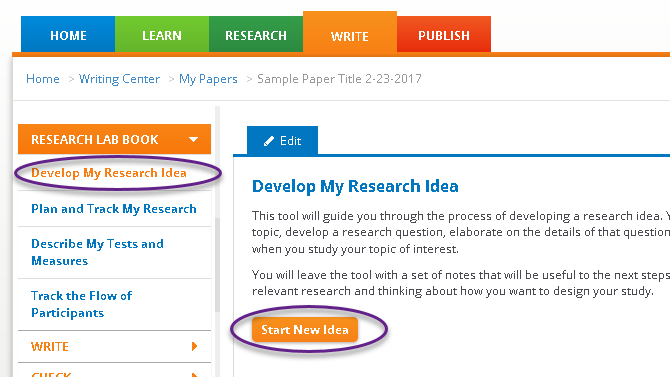
APA Style CENTRAL – Research Lab Book: Develop My Research Idea

Today we’d like to highlight one of our APA Style CENTRAL® handouts, “Research Lab Book: Develop My Research Idea” (PDF, 599K). Please feel free to link to this handout where students, faculty, and researchers will find it!

""APA Style CENTRAL’s Research Lab Book is a suite of tools to help you plan and document your research process. Develop My Research Idea guides you through developing a research idea that is neither too broad nor too narrow. Appropriate for use with original research or a literature review, this 5-step approach walks you through a structured framework for brainstorming your interests, identifying a specific topic, developing a research question, elaborating on the details of that question, and clarifying your expectations about the outcome of your research.

When you’re done, you’ll be ready to search for relevant literature and begin considering your study design.

Undergraduates and others who can benefit from a more structured way of formulating a research topic will find this tool helpful.

Faculty and writing instructors can also use these steps individually or in combination as Continue reading