APA PsycInfo Expert Tip: Searching by Keyword, Index Term and More

Have you ever wondered what the difference is between a keyword and an index term, and how they can aid your search? What are classification codes, and how does this all relate to MeSH terms? This post will demystify the four types of vocabulary you see in APA PsycInfo®.

Keyboard with rainbow colors reflecting off of it

Keywords (also called Key Concepts or Identifiers) – Individual words, key concepts, or brief phrases that describe the document’s content. The list of keywords for an article is often provided by the author or publisher, though sometimes it is created by APA staff. There is no pre-existing list of keywords that authors, publishers, or APA staff choose from.

Keyword searching is a good fit for researchers who are new to a topic, and want to get the full scope of what is available. Keyword searching is most similar to the searching you may do on the internet, because keywords are often in natural language or layman’s terms. In addition, you do not need to select or know terms from a pre-existing list, as you do for the following three types of vocabulary.

Index Terms (also called Subjects or Subject Headings) – Index terms are also single words or brief phrases that describe the document’s content, but they are chosen from a pre-existing list (also called a controlled vocabulary). For the APA databases, that list is the Thesaurus of Psychological Index Terms®, which includes more than 8,400 terms. APA staff typically choose about six index terms for each document. You can use the thesaurus tool, linked from the APA PsycInfo search page, to search or browse index terms alphabetically or by topic.

Index term searching is a good fit for the focused researcher, who has identified their best term(s) and now wants to quickly find all of the items about a particular concept. With the wide variety of concepts and vocabulary used in the psychological literature, searching for and retrieving records about specific concepts is virtually impossible without the controlled vocabulary of a thesaurus. It provides a way of structuring the subject matter in a way that is consistent among users (e.g., searching for Dysphoria, Melancholia, and Depression can all be achieved by searching the term “Major Depression”).

Continue reading

Exhibits Update: Society for Personality and Social Psychology Convention

The Society for Personality and Social Psychology Convention will be held at the Henry B. Gonzalez Convention Center in San Antonio, TX, from Thursday, January 19 – Saturday, January 21, 2017. The American Psychological Association will be participating in the Exhibits Hall throughout the conference.


Stop by to learn more about APA Style CENTRAL®, an exciting new institutional electronic resource for APA Style® that launched this summer, and get the latest updates about APA Journals, Books, and Databases.


And be sure to look for our Theater Session, Teaching with APA Style CENTRAL on Saturday, January 21, 2017, 11:00 am to 12:15 pm.

How Permissions Work in PsycTESTS

PsycTESTS® is a research database that provides information on tests that originated in the scholarly literature. Tests are mined from the journals currently covered in the PsycINFO database.

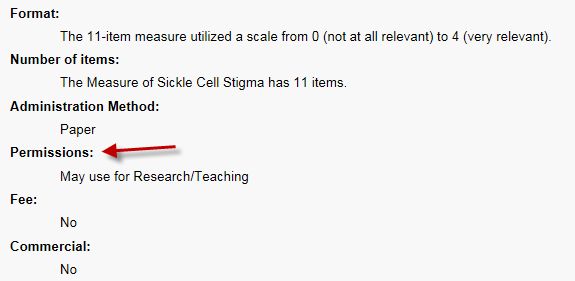
PsycTESTS records include citations and links to articles that discuss the development of the test and how it can be used. Each PsycTESTS record includes a Permissions field with information about how the test can be used in your research or clinical work.

Currently, over 24,000 PsycTESTS records (almost 60%) grant the permission “May use for Research / Teaching.”

The test PDF has a cover sheet with a longer description of Research / Teaching use:

Test content may be reproduced and used for non-commercial research and educational purposes without seeking written permission. Distribution must be controlled, meaning only to the participants engaged in the research or enrolled in the educational activity. Any other type of reproduction or distribution of test content is not authorized without written permission from the author and publisher. Always include a credit line that contains the source citation and copyright owner when writing about or using any test.

Examples of permitted use include:

  • Using the test for educational purposes, for example in a school project
  • Publishing the results of research using the test, as well as the test itself, with a copyright notice giving credit to the original test authors
  • General use in a clinical setting

Examples of nonpermitted use include:

  • Posting the test online
  • Implying or stating that the test is your original work
  • Publishing the test or selling the test to a commercial publisher
  • Using the test in research intended to support commercial gain

Continue reading

Setting up a PsycTESTS Search

topPsycTESTS® is a research database that provides information on tests mined from the scholarly literature in PsycINFO®. Nearly 40,000 unique tests are represented in PsycTESTS, organized into 15 instrument types and 30 classifications.

There are a number of ways to search for a test, including the author name, keywords, test name, or test construct. (A construct is the concept the test is measuring, such as Confidence or Anxiety.)

PsycTESTS also includes limits, or controlled lists of values, that can be set before you run the search, toward the bottom of the advanced search page, or after you run the search, along the side of the search results page. These limits include:

  • Administration Method – how the test is given to participants, such as Paper or Interview.
  • Fee – indicates whether or not there is a fee for test use.
  • Instrument Type – the primary testing category of the instrument, such as Checklist or Task.
  • Permissions – the level of permissions needed in order to use a test. The Permissions statement may grant use for non-commercial research and teaching, or it may specify who to contact to obtain these permissions.
  • Supporting Documentation – supporting documentation types, such as instructor guide or answer sheet.

These next three limits may seem familiar from PsycINFO:

  • Age Group – specific population age groups that were the focus of the test.
  • Population Group – populations to which the test was administered. Possible values are Human, Animal, Male, Female, Inpatient and Outpatient.
  • PsycTESTS Classification – the general area of psychology that the measure is designed to assess, such as Human-Computer Interaction or Personality. (The PsycTESTS Classification system was created using the same principles behind the PsycINFO Classification Codes, but the codes and descriptors are different for these databases.)

There is also a Full Text Test Available checkbox that limits your search to records that have the PDF of the test attached to the descriptive record.

middle

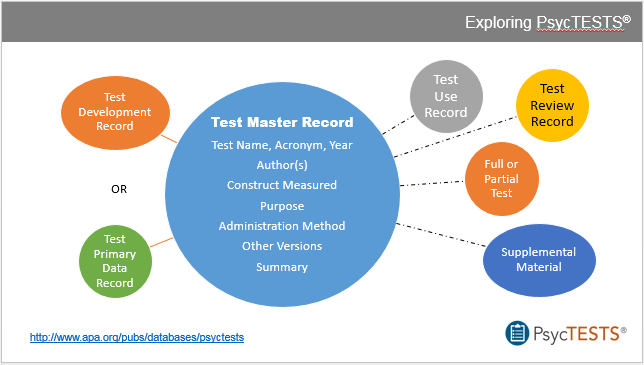
Opening a record from the search results takes you to the Test Master Record, which provides a profile and descriptive summary of the test.

Test Master Records have one or more Test Child Records that include information related to the test’s development, use, or review.

Child records may be:

  • Test Development: discusses the development of the test. You’ll see this for most of the tests in the database.
  • Test Review: reviews the test – this is available for a small percentage of the tests.
  • Test Use: reports on a new use of the test – for example, a researcher may have taken a test designed for adults and administered it to teenagers. This is also available for a small percentage of tests.

For more detailed information for your platform – APA PsycNET®, EBSCOhost, Ovid or ProQuest – please view our presentation on SlideShare.

image

Searching Many Terms at Once on PsycINFO

When you begin a review of the literature, it’s important to construct a successful search query that harnesses all the research on the topic. One way to do this is to search for synonyms and related concepts at the same time.

First, list the concepts that you are researching. This can be done with pen and paper. For example, I want to learn more about ADHD in teenagers, particularly at school.

Next, brainstorm alternate terms for each of your concepts. ADHD could also be called: ADD, hyperactivity, or attention deficit disorder. Teenagers could also be called: adolescents, teens, or high schoolers. School could also be called: education, classroom, class, academic, or learning.

Keep the terms you brainstorm for each concept together in their own group – we’ll call these your concept groups. Within the concept groups, you’ll join the terms together with OR. The OR search will find items that include at least one of the terms you include, so you’ll get a lot of results from these searches.

Next, you’ll join the searches you just created for your concept groups with AND. In the type of search we’re building, the AND search will find items that include at least one term from each concept group.

long-search-post-imageOnce you have your concept groups mapped out, you can begin your research on PsycINFO® by following these steps. For more detailed information for your platform – APA PsycNET, EBSCOhost, Ovid or ProQuest – please view our presentation on SlideShare.

  1. Before you type anything, login into (or create) your personal account. This allows you to edit your search, and to save the search to run again later. 
  2. Open your PsycINFO advanced search page. Customize the search by adding more rows for search terms, and changing the conjunction from AND to OR.
  3. Most platforms will search All Text or All Fields as a default. This is a fine starting point, or you can pick a particular field to search, such as Keywords, Abstract, or Title.
  4. Type in the terms for your first concept group: ADHD OR ADD OR hyperactivity OR attention deficit disorder. Run the search and save it to your account
  5. Run the rest of the concept group searches and save them.
  6. Within the saved searches page, you can combine your searches with AND. Save this master search too!
  7. This may be a large number of results to work with. Now that your full search is saved, you can further refine it by adding or removing terms, or adding limits such as document type or methodology. If your project is long term or ongoing, you can run this saved search once a month or once a week to review just the recently published articles on the topic.

For more detailed information for your platform – APA PsycNET, EBSCOhost, Ovid or ProQuest – please view our presentation on SlideShare.

slideshare


APA PsycNET: slides 5-13
EBSCOhost: slides 14-21
Ovid: slides 22-29
ProQuest: slides 30-37


If you’re affiliated with a college or university, you can ask a librarian for assistance with your search. Subscribers to APA PsycNET® Gold, Gold Plus, and Platinum packages can contact APA Databases & Electronic Resources Customer Relations at psycinfo@apa.org or 800-374-2722.


Related Training Resources

Using Index Terms and Keywords (APA PsycNET): https://www.youtube.com/watch?v=dFeyRb73yZM

PsycINFO YouTube Channel playlist: Using the Methodology Limiter: https://www.youtube.com/playlist?list=PLZhiJFnGuh4whhw0wUwrrYhFWYvbedmiA

Setting up an alert (APA PsycNET): https://www.youtube.com/watch?v=fVdD0UtC-Xg

You may be interested in attending our PsycINFO Results Management training (all platforms): http://www.apa.org/pubs/databases/training/webinars-students.aspx